Group call flow
This page describes the flow of LINE Planet's group call (conference).
In the diagrams below, app clients and the app server belong to the application domain, and PlanetKit and LINE Planet Cloud belong to the LINE Planet domain.
Joining a group call
To join a group call, an app client must call joinConference(). When a user joins a group call, the evtConnected event occurs.
A room ID is required to join a group call room. Therefore, app clients must share a room ID through an application communication channel before joining a group call.
The following diagram shows a flow for joining a group call, where Client 01 joins a group video call with video and then Client K joins the group call without video.
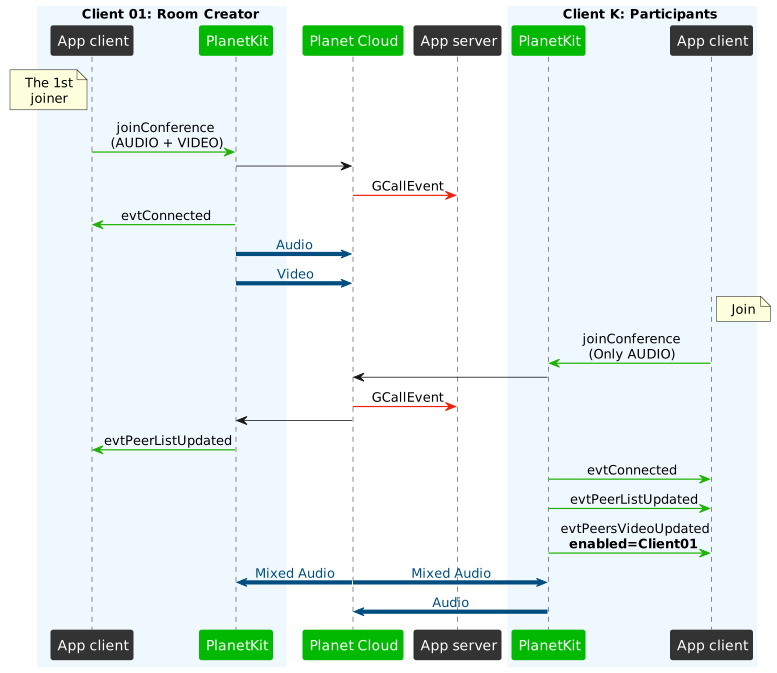
- When Client 01 wants to join a call, the app client of Client 01 calls
joinConference(). - Planet Cloud invokes the Group Call Event callback to notify the app server of the new group call.
- The
evtConnectedevent occurs on the app client of Client 01. - When Client K wants to join the call, the app client of Client K calls
joinConference(). - Planet Cloud invokes the Group Call Event callback to notify the app server of the group call's status change.
- On the app client of Client 01, the
evtPeerListUpdatedevent occurs. On the app client of Client K, theevtConnected,evtPeerListUpdated, andevtPeersVideoUpdatedevents occur.
In the flow above, you can see three related events.
| Event | Condition | Description |
|---|---|---|
evtConnected | After joinConference() is called | Completion callback |
evtPeerListUpdated | After someone joins or leaves the room | Delivers the list of participants who newly joined or left the room |
evtPeersVideoUpdated | - After someone joins the room and enables or disables video - When someone joins the room with video enabled | Delivers the list of participants who enabled or disabled video |
Peer list updated event
The evtPeerListUpdated event occurs whenever the list of participants is updated. Therefore, after Client K joins a room, both Client 01 and Client K receive this event.
Peers video updated event
The evtPeersVideoUpdated event occurs whenever a participant's video stream changes.
In the example above, only Client 01 is sending video, and the evtPeersVideoUpdated event lets Client K know that Client 01 enabled video.
The evtPeersVideoUpdated event can also be generated by enabling a video call during an audio call. For more information, refer to Enabling video call.
Update interval of the events
An app client receives evtPeerListUpdated and evtPeersVideoUpdated based on the latest information within the update interval. As a result, the app client may not receive events for quick changes that occur within an update interval, such as when someone joins and leaves the room right away.
LINE Planet Cloud has a scheduler that updates information internally, and the scheduling interval becomes longer as the number of participants increases. Therefore, keep in mind that the update becomes slower in proportion to the number of participants.
Requesting peer video
An app client automatically receives the audio stream after receiving the evtConnected event. However, a video stream is not sent automatically by LINE Planet Cloud unless the app client calls requestPeerVideo() with a proper video resolution.
Applications can find out who enabled the video stream from the evtPeersVideoUpdated callback.
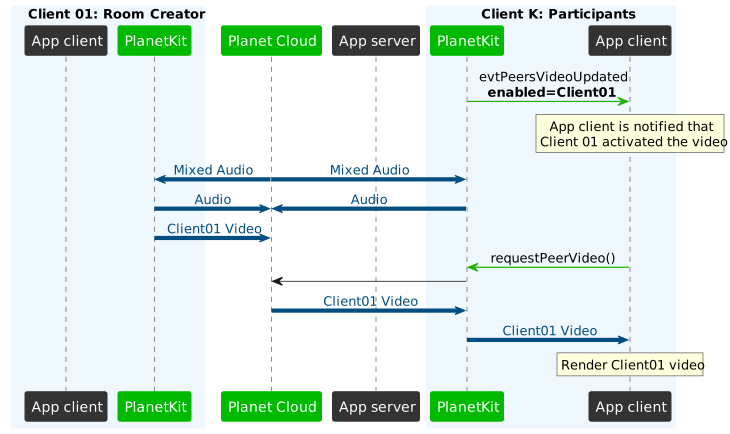
It is recommended that you pass an appropriate resolution value when calling requestPeerVideo(). For a more detailed explanation, see Peer video resolution in a group call.
Leaving a group call
To leave a group call, an app client must call leaveConference(). On the app client of the user who left the group call, the evtDisconnected event occurs. On the app clients of peers, the evtPeerListUpdated event occurs because the list of participants has been changed.
Participant with video enabled
If the participant who enabled video leaves the room, evtPeersVideoUpdated is sent to other participants.
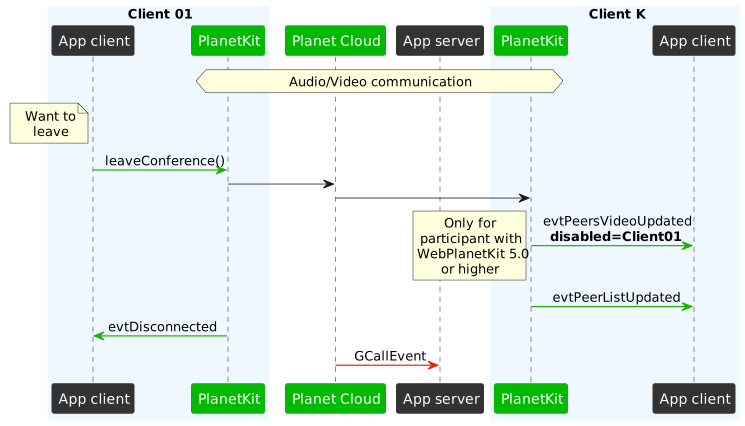
- When Client 01 wants to leave a call, the app client of Client 01 calls
leaveConference(). - On the app client of Client K, the
evtPeersVideoUpdatedandevtPeerListUpdatedevents occur. On the app client of Client 01, theevtDisconnectedevent occurs. - Planet Cloud invokes the Group Call Event callback to notify the app server of the group call's status change.
The evtPeersVideoUpdated with DISABLED state is sent only to participants who are using WebPlanetKit 5.0 or higher.
Participant with video disabled
If the participant who disabled video leaves the room, evtPeersVideoUpdated does not occur.
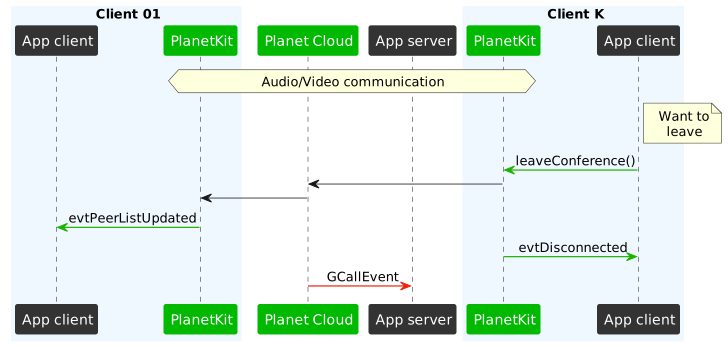
- When Client K wants to leave a call, the app client of Client K calls
leaveConference(). - On the app client of Client 01, the
evtPeerListUpdatedevent occurs. On the app client of Client K, theevtDisconnectedevent occurs. - Planet Cloud invokes the Group Call Event callback to notify the app server of the group call's status change.
Related API
APIs related to group calls are as follows.