Presentation - Screen share
Presentation means sharing a screen of a user (presenter) to show a material such as slides to the other call peers. This page describes how to use the presentation function based on the call type.
| Supported call type | Minimum SDK version |
|---|---|
| 1-to-1 call, group call (conference) | PlanetKit 3.0 |
PlanetKit uses HD resolution in its presentation feature, so it can provide an optimized service when the client's network conditions meet or exceed the recommended bandwidth.
1-to-1 call presentation
To start or end a presentation in a 1-to-1 call, use startMyScreenShare() or stopMyScreenShare() of PlanetKitCall.
Related APIs
The following table shows APIs related to screen share in a 1-to-1 call, where a counterpart means a peer to whom to show the presentation.
| Presenter-side API | Description | Counterpart-side API | Description |
|---|---|---|---|
startMyScreenShare() | Starts screen share by a presenter | onPeerScreenShareStarted | Screen share by a presenter has been started |
| - | - | addPeerScreenShareView() | Sets a view instance created by an application |
stopMyScreenShare() | Ends screen share by the presenter | onPeerScreenShareStopped | Screen share by the presenter has been stopped |
| - | - | removePeerScreenShareView() | Removes the view instance before release |
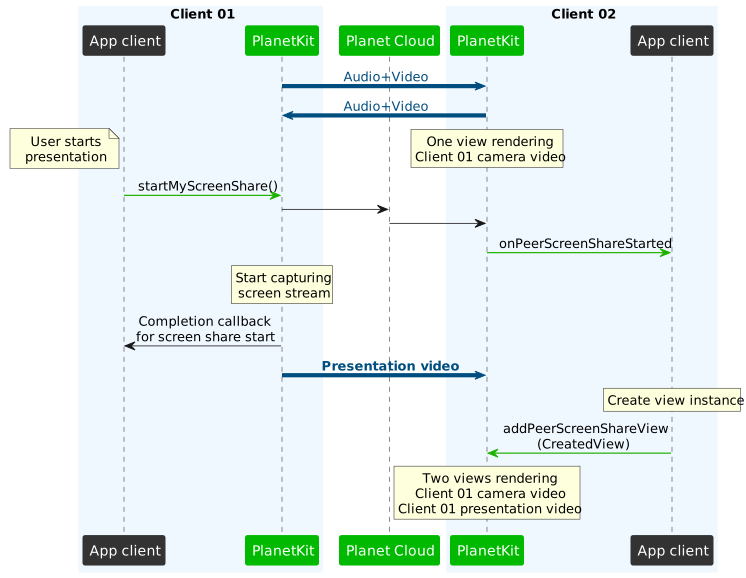
After being notified by onPeerScreenShareStarted that a presentation has started, the counterpart side must create a view instance and call addPeerScreenShareView() to let PlanetKit render the shared screen.
The presentation video data is automatically streamed to the peer.
1-to-1 call presentation flow
The following diagram shows the flow for starting a presentation in 1-to-1 calls.
The following diagram shows the flow for stopping a presentation in 1-to-1 calls.
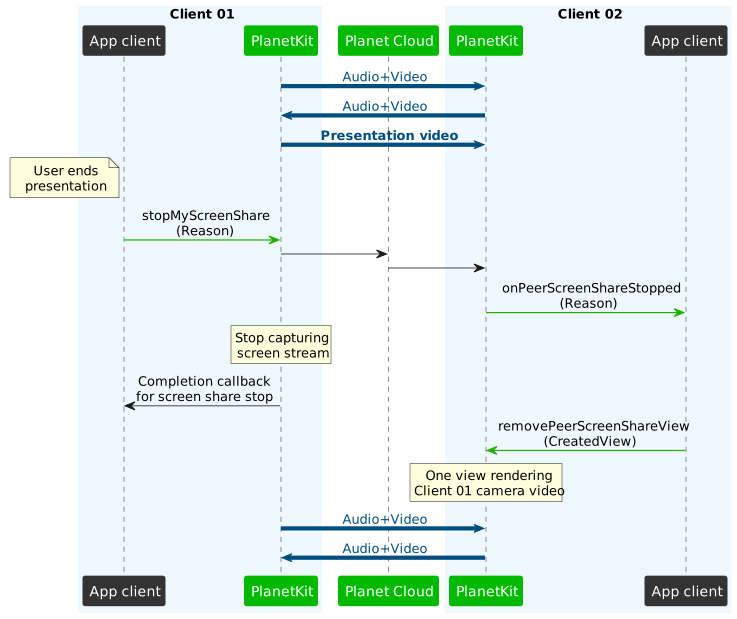
Reason to stop screen share
When you call stopMyScreenShare(), you can set one of the reasons defined by application requirements. Allowed values are integers from 0 to 39, and you must define the reasons and values and use them consistently across applications on different platforms. If a valid reason is set, the onPeerScreenShareStopped event delivers this value.
Sample code
The following is sample code for the screen share feature in a 1-to-1 call.
For a more complete code example, refer to Screen share in a 1-to-1 call.
Starting screen share
// Start screen share
// screenCapturer: ScreenCapturerVideoSource instance for capturing screen content
fun startMyScreenShareExample(call: PlanetKitCall, screenCapturer: ScreenCapturerVideoSource) {
    call.startMyScreenShare(screenCapturer) { result ->
        Log.d(TAG, "startMyScreenShare result: ${result.isSuccessful}")
    }
}
Stopping screen share
// Stop screen share
fun stopMyScreenShareExample(call: PlanetKitCall) {
    call.stopMyScreenShare { result ->
        Log.d(TAG, "stopMyScreenShare result: ${result.isSuccessful}")
    }
}

// Stop screen share with specific reason
// reason: User-defined reason code for stopping screen share
fun stopMyScreenShareWithReasonExample(call: PlanetKitCall, reason: Int) {
    call.stopMyScreenShare(reason) { result ->
        Log.d(TAG, "stopMyScreenShare(reason=$reason) result: ${result.isSuccessful}")
    }
}
Handling screen share events on the receiver side
// Implement related callbacks of the CallListener interface
// MakeCallListener for caller and AcceptCallListener for callee
private val makeAcceptCallListener = object : MakeCallListener, AcceptCallListener {
    ...

    override fun onPeerScreenShareStarted(call: PlanetKitCall) {
        // This is called when the peer started screen share.
        // Write you own code here.
    }

    override fun onPeerScreenShareStopped(call: PlanetKitCall, disabledReason: Int?) {
        // This is called when the peer stopped screen share.
        // Write you own code here.
    }
}
Rendering a screen share video on the receiver side
fun renderPeerScreenShareVideoExample(call: PlanetKitCall, videoView: PlanetKitVideoView) {
    call.addPeerScreenShareView(videoView)
}
Removing a screen share video on the receiver side
fun removePeerScreenShareVideoExample(call: PlanetKitCall, videoView: PlanetKitVideoView) {
    call.removePeerScreenShareView(videoView)
}
Group call presentation
To start or end a presentation in a group call, use startMyScreenShare() or stopMyScreenShare() of PlanetKitConference.
Related APIs
The following table shows APIs related to screen share in a group call, where counterparts mean participants in a group call to whom to show the presentation.
| Presenter-side API | Description | Counterpart-side API | Description |
|---|---|---|---|
startMyScreenShare() | Starts screen share by a presenter | onScreenShareUpdated of ConferenceListeneronScreenShareUpdated of PeerControlListener(state=ENABLED) | Screen share by a presenter has been started |
| - | - | addPeerScreenShareView() | Sets a view instance created by an application |
| - | - | startScreenShare() of PlanetKitPeerControl | Starts rendering the screen share video on a screen share view |
stopMyScreenShare() | Ends screen share by the presenter | onScreenShareUpdated of ConferenceListeneronScreenShareUpdated of PeerControlListener(state=DISABLED) | Screen share by the presenter has been stopped |
| - | - | removePeerScreenShareView() | Removes the view instance before release |
| - | - | stopScreenShare() of PlanetKitPeerControl | Stops rendering the screen share video on a screen share view |
changeMyScreenShareDestination()changeMyScreenShareDestinationToMainRoom() | Changes the destination subgroup of the screen share. | onScreenShareUpdated of ConferenceListeneronScreenShareUpdated of PeerControlListener(state=ENABLED or DISABLED) | Screen share to a specific subgroup has been started or stopped |
You can use the methods of PlanetKitPeerControl to control screen share video on a peer's screen share view. For more information on how to use PlanetKitPeerControl, refer to the group call screen share code example.
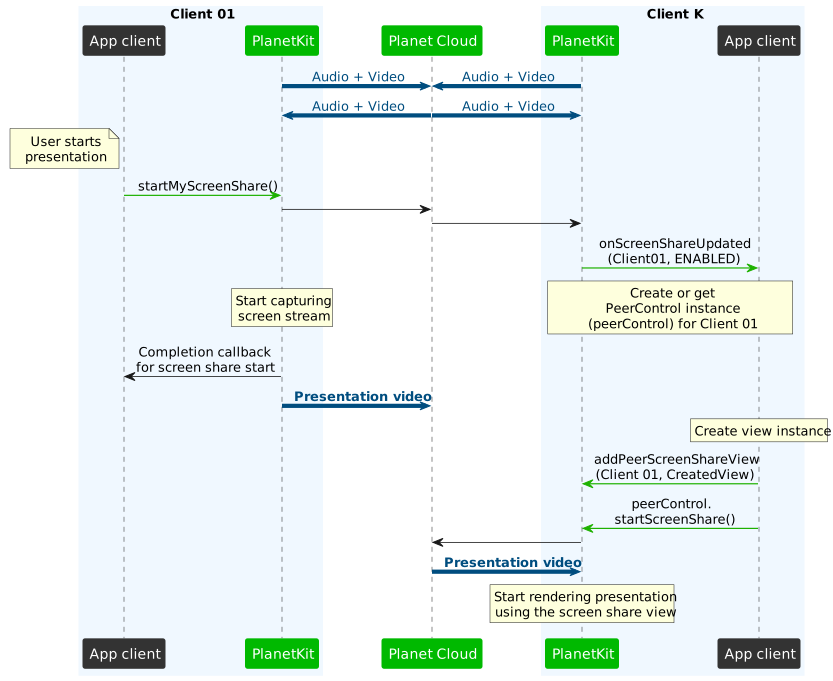
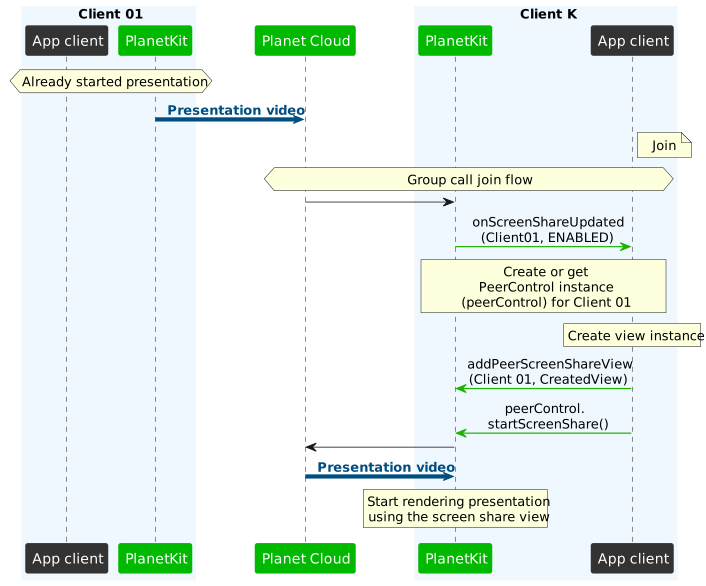
After being notified by onScreenShareUpdated of ConferenceListener or onScreenShareUpdated of PeerControlListener that a presentation has started (state=ENABLED), the counterpart side must set the view with addPeerScreenShareView() and call startScreenShare() of PlanetKitPeerControl to let PlanetKit render the shared screen.
Unlike 1-to-1 calls, presentation video data is not automatically streamed to participants. Therefore, the counterpart side in group calls must call startScreenShare() of PlanetKitPeerControl to receive the presentation video data.
Group call presentation flow
The following diagram shows the flow for starting a presentation in group calls.
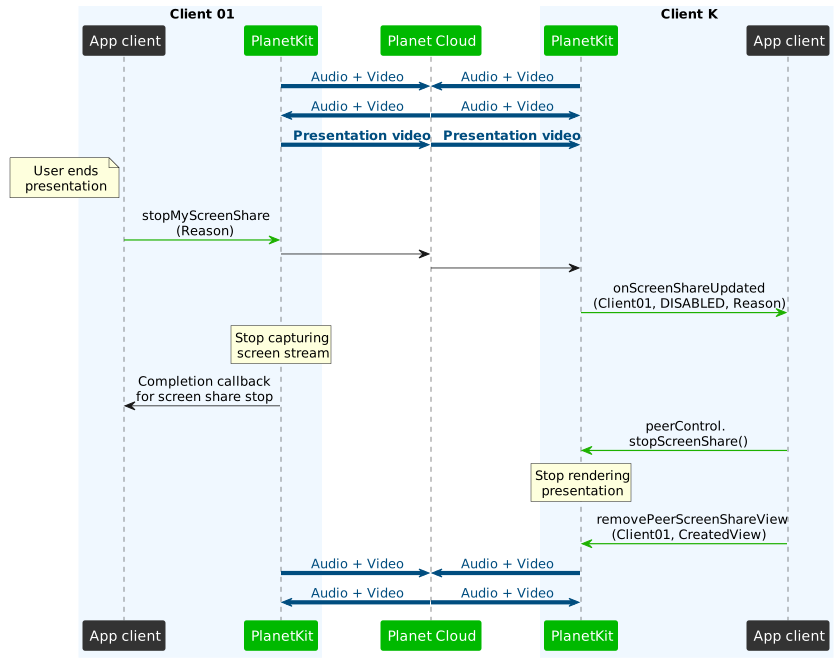
The following diagram shows the flow for stopping a presentation in group calls.
The following diagram shows the flow for a user who joined after a presentation started in a group call.
Reason to stop screen share
When you call stopMyScreenShare(), you can set one of the reasons defined by application requirements. Allowed values are integers from 0 to 39, and you must define the reasons and values and use them consistently across applications on different platforms. If a valid reason is set, the onScreenShareUpdated and onScreenShareUpdated events deliver this value.
Presentation within a subgroup
A presentation feature is available within a subgroup when the presenter subscribed to the subgroup with the "dataSession" attribute set to true. If the presenter starts a presentation within a subgroup scope, the presentation video data is only shared with the members of the subgroup.
To change the destination subgroup of the screen share, use changeMyScreenShareDestination() or changeMyScreenShareDestinationToMainRoom(). For more information, see Subgroup flow - Screen share.
PlanetKit supports the function to receive two screen share streams at the same time. Receiving two presentation videos might cause confusing UX or heavy traffic. However, it can be useful in relation to the subgroup feature.
For example, let's say the first presenter started a presentation to all participants, and the second presenter started a presentation within a subgroup scope. Subgroup members can choose to receive one of them or both by controlling startScreenShare() of PlanetKitPeerControl.
Sample code
The following is sample code for the screen share feature in a group call.
For a more complete code example, refer to Screen share in a group call
Starting screen share
// Start screen share to main room
// screenCapturer: ScreenCapturerVideoSource instance for capturing screen content
fun startMyScreenShareExample(conference: PlanetKitConference, screenCapturer: ScreenCapturerVideoSource) {
    conference.startMyScreenShare(screenCapturer) { result ->
        Log.d(TAG, "startMyScreenShare result: ${result.isSuccessful}")
    }
}

// Start screen share to specific subgroup
// subgroupName: Target subgroup name, or null for main room
fun startMyScreenShareToSubgroupExample(
    conference: PlanetKitConference,
    screenCapturer: ScreenCapturerVideoSource,
    subgroupName: String?
) {
    conference.startMyScreenShare(screenCapturer, subgroupName) { result ->
        Log.d(TAG, "startMyScreenShare(subgroup=$subgroupName) result: ${result.isSuccessful}")
    }
}
Stopping screen share
// Stop screen share
fun stopMyScreenShareExample(conference: PlanetKitConference) {
    conference.stopMyScreenShare { result ->
        Log.d(TAG, "stopMyScreenShare result: ${result.isSuccessful}")
    }
}

// Stop screen share with specific reason
// reason: User-defined reason code for stopping screen share
fun stopMyScreenShareWithReasonExample(conference: PlanetKitConference, reason: Int) {
    conference.stopMyScreenShare(reason) { result ->
        Log.d(TAG, "stopMyScreenShare(reason=$reason) result: ${result.isSuccessful}")
    }
}
Changing screen share destination
// Change screen share destination to a specific subgroup
// toSubgroupName: Target subgroup name to change to
fun changeScreenShareDestinationExample(conference: PlanetKitConference, toSubgroupName: String) {
    conference.changeMyScreenShareDestination(toSubgroupName) { result ->
        Log.d(TAG, "changeMyScreenShareDestination(to=$toSubgroupName) result: ${result.isSuccessful}")
    }
}

// Change screen share destination to main room
fun changeScreenShareDestinationToMainRoomExample(conference: PlanetKitConference) {
    conference.changeMyScreenShareDestinationToMainRoom { result ->
        Log.d(TAG, "changeMyScreenShareDestinationToMainRoom result: ${result.isSuccessful}")
    }
}
Handling screen share events on the receiver side
// Implement related callback of ConferenceListener
private val conferenceListener = object : ConferenceListener {
    ...

    override fun onScreenShareUpdated(
        peer: PlanetKitConferencePeer,
        subgroupName: String?,
        screenShareState: PlanetKitScreenShareState,
        disabledReason: Int?
    ) {
        // This is called when a peer's screen share state changes.
        when (state) {
            PlanetKitScreenShareState.ENABLED -> {
                Log.d(TAG, "Peer started screen share")
                // Add your own code here
            }
            PlanetKitScreenShareState.DISABLED -> {
                Log.d(TAG, "Peer stopped screen share")
                // Add your own code here
            }
        }
    }
}
// Implement related callback of PeerControlListener
private val peerControlListener = object : PlanetKitPeerControl.PeerControlListener {
    ...

    override fun onScreenShareUpdated(
        peer: PlanetKitConferencePeer,
        state: PlanetKitScreenShareState,
        subgroupName: String?,
        disabledReason: Int?
    ) {
        // This is called when the peer's screen share state changes.
        when (state) {
            PlanetKitScreenShareState.ENABLED -> {
                Log.d(TAG, "Peer screen share enabled")
                // Add your own code here
            }
            PlanetKitScreenShareState.DISABLED -> {
                Log.d(TAG, "Peer screen share disabled")
                // Add your own code here
            }
        }
    }
}
Starting a screen share video on the receiver side
fun startPeerScreenShareVideoExample(conference: PlanetKitConference, peerControl: PlanetKitPeerControl, subgroupName: String?, videoView: PlanetKitVideoView) {
    conference.addPeerScreenShareView(peerControl.peer.user, videoView)
    videoView.resetFirstFrameRendered()
    peerControl.startScreenShare(subgroupName) { result ->
        Log.d(TAG, "startScreenShare result: ${result.isSuccessful}")
    }
}
Stopping a screen share video on the receiver side
fun stopPeerScreenShareVideoExample(conference: PlanetKitConference, peerControl: PlanetKitPeerControl, videoView: PlanetKitVideoView) {
    peerControl.stopScreenShare { result ->
        Log.d(TAG, "stopScreenShare result: ${result.isSuccessful}")
    }

    conference.removePeerScreenShareView(peerControl.peer.user, videoView)
}